


RGBTW Controller

WiZ RGBTW Controller I 12-24V
BS-WIZCV1224-180/RGBTW
WiZ-connected BERSN RGBTW controllers can interact with constant voltage LED transformers to allow color and tunable white control features. Can extend LED life and save energy; it has the advantages of convenient wiring, simple use, etc. The bridge box's advanced architecture aids in the development of a dependable and standardized linked lighting system with various features ranging from simple wireless dimming to cloud-based operations.

Features
• PWM dimming method with mutiple channel outputs
• Ideal for both standalone and built-in
• An energy metering feature with a 10% accuracy
• Maximum output load of 180W
• A Wi-Fi + Bluetooth dual protocol module that enables local Bluetooth messages for setup and WiZ cloud connectivity
Applications
• Residential
• Hospitality
• Restaurant
• Retail
• School
• Leisure places
Electrical Data
|
Item |
WiZ RGBTW Controller I 12-24V |
|
Model No. |
BS-WIZCV1224-180 |
|
Rated input voltage |
12…24Vdc |
|
Rated input current |
7.5A @ Max output power |
|
Max input power |
180W @ Max output power /@ Max Rated input voltage |
|
Rated output current |
7.5A max total; 3.75A max per channel |
|
Standby power |
<0.5W @ Rated input voltage |
|
ESD |
4KV @ HBM, 8KV @ air |
|
Dimming method |
PWM, 2KHz |
|
Dimming range |
0-100% |
|
Ambient temperature |
-20…+50ºC |
|
Tcase-life |
75ºC |
|
Lifetime |
50,000 hrs |
|
Mains switching cycles |
100,000 Cycles |
|
Connection |
Wi-Fi IEEE802.11 b/g, BLE 4.2 |
|
Audible noise |
<24 dB @ 5cm |
|
Ingress Protection |
IP20 |
|
Approval Marks |
CE-RED |
All specififications are typical and at 25°C Tcase unless otherwise specifified.
RF Interface
|
Communication method |
Wifi + BLE |
|
Wifi Frequency |
2400-2483.5 Mhz (IEEE Std 802.11 b/g) |
|
Wifi Transmission power |
20dbm Max |
|
BLE Frequency |
2400-2483.5 Mhz |
|
BLE Transmission power |
3dbm Max |
|
Wifi channel |
1...13 |
Push Button
|
Push button |
Tact switch, for pairing and factory reset |
|
Notes: 1) Press for under<2 s and release : product does a soft reboot 2) Press for 2s < < 10s and release : product goes into forced pairing mode, outputs dimming variations 3) Press for 10s< and release : reset to factory settings (forgets favorites and Home ID) and reboots |
|
Wiring and Connections
|
Input Wire Type |
1.5 mm2 |
|
Output Wire Type for RGBTW negative |
1.0 mm2 |
|
Output Wire Type for RGBTW Positive |
1.0 mm2 |
|
Wire Length |
130 mm (+/- 5mm) |
|
Wire Strip Length |
10 mm (+/- 5mm) |

Example of Connection
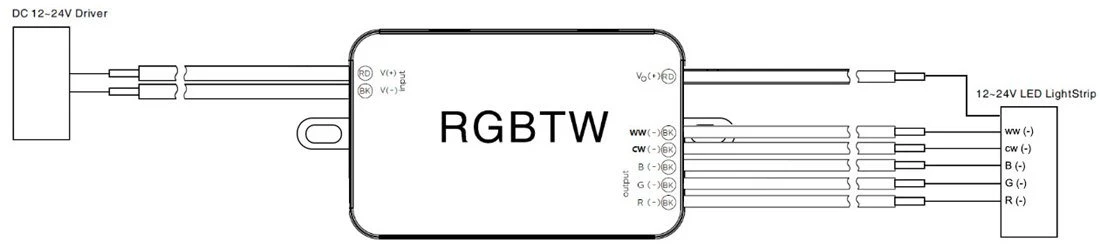
-
Input Power Wiring: The WiZ CV RGBTW controller has a terminal block for connecting input power. You will need to connect the power supply wire (usually AC power) to this terminal.
-
Output Fixture Wiring: The WiZ CV RGBTW controller also has one or more output terminals for connecting fixtures. You will need to connect the fixture's wiring to these output terminals, making sure to connect the RGBTW fixture's R, G, B, W, and +C wires correctly.
Pin Definition

|
A -R (-) - Black |
Output: R LED Strip |
|
B - G (-) - Black |
Output: G LED Strip |
|
C - B (-) - Black |
Output: B LED Strip |
|
D - CW (-) - Black |
Output: CW LED Strip |
|
E - WW (-) - Black |
Output: WW LED Strip |
|
F - Vo (+) - Red |
Output: LED Strip V+ |
|
G - in(-) - Black |
DC Power supply negative input |
|
H - Vin (+) - Red |
DC Power supply positive input |
Dimensions & Weight
|
Dimensions LxWxH |
89x40x29mm |
|
Color |
White |
|
Weight |
57 g |
Benefits
• Easy wireless dimming and scheduling for energy saving and convenience
• Connecting to Wi-Fi for cloud-based control and remote access. No gateway needed
• Future-proof flexibility, support OTA (Over-The-Air) firmware update
• Large array of integrations to work with popular home assistant systems
• WiZ Click feature enables easy installation
• CE ROHS certified
Production Process:
-
Design and R&D
-
supply chain management
-
manufacturing
-
Testing and Debugging
-
Packaging and distribution
WIZ App Installation

For iOS users:
-
Open the App Store.
-
Click the "Search" tab at the bottom and enter "WiZ" in the search bar.
-
Find WiZ App and click the "Get" button to install it.
-
After the installation is complete, you can find WiZ App on the home screen of your phone or in the application list, click on the icon to open and use it.
For Android users:
-
Open the Google Play Store.
-
Search by typing "WiZ CN V2" in the search bar.
-
Find WiZ App and click the "Install" button to install it.
-
After the installation is complete, you can find WiZ App in the application list of your phone, click on the icon to open and use it.
You Might Also Like


Send Inquiry